A Tale of Two Tools: workon and sessions
Now that my workflow is fully integrated with artificial intelligence, I am never-ever working on only a single thing at a time. I’m usually not even working for a single client at a time. Because of this, I have restructured my working style around the New World Order. So until SkyNet comes and ruins the party, I need a way to keep track of all the things I care about.
I started my professional career as a humble systems administrator for the Computing & Information Sciences department (now just the Computer Science department) of Kansas State University. As such, I learned to live in the terminal and I learned to prefer any software that was rock solid and reliable, so I switched from PCs running Linux to Apple laptops running Mac OS X. This has continued until today. Over time, I built up a long list of standard programs and tools I used and collected them into my dotfiles repository, where all my favorite tools are configured and kept working and I keep the instructions and scripts that I use to install and maintain all my favorite things on each new laptop I adopt.
The Setup
My primary working environment has long been my terminal window. It started with screen and vim on iTerm, which evolved eventually into tmux and vim running on Kitty as my terminal of choice. (The buttery smoothness of a graphics-accelerated terminal is so nice.) As I did more and more whole application work over the past few years and switched from Perl as my primary language to a combination of Golang and TypeScript, I found it useful to switch to an IDE, something I’d avoided most of my career (I didn’t like the mushiness I felt when I started using tab completion too much). This placed me well for adopting Copilot autocompletions when that became a thing everyone was doing in 2023.
Today, though, I’m tending to fall back to vim and tmux and forget the IDE. Completion is no longer the thing. Instead, I talk to the AI agent and it does all the work, whether deciding which commands to run for me and reporting back what happened or doing the editing I used to do on my own. However, I’m a software engineer, dadgum it, and while I have a lot of trust for my agents, I do not have total trust of my agents. There are a lot of actions I run myself, examine myself, and I spot check the work of the agents because sometimes they don’t quite do what I want, whether they hallucinate, get lost, get stuck on a detail that doesn’t matter, do too much, or just talk too much.
So what I need is a tmux session for each piece of work I’m tracking and in each piece of work, I need a shell where I can run things manually and a chat session where I can talk to the agent, but making all that happen is annoying.
Enter Workon
I have written a script named workon. I have used this script for a decade to set up and manage my tmux sessions. It has gone through several iterations, but I rewrote it a few months back into the current form. And it works like this:
workon 0/zostay.com
I organize my projects under a folder named projects. Under projects, I have a set of subfolders subdivided by client or programming language. Or the fallback is a directory named 0. (The actual history of why I picked 0 goes back to a job I had almost twenty years ago and is very boring. I think the workon script actually goes back that long, though I think I named it start or something when I first built it, but I digress.) So, I name a subdirectory under projects and the project name. This is the identifier I like to use to keep track of what I’m working on.
The script searches for the project directory and then turns that into a name that works for tmux session names. So the one above becomes zostay-com. It looks for an existing tmux session with this name and opens it in the current terminal if one is already open. If one is not, it runs a startup script, which creates the tmux session in the project directory and then ensures that the session has three panes. Pane 0 in the upper left is my shell where I run commands or open vim. Pane 1 in the lower left is a session list (see Enter Sessions below). Pane 2 takes up the right and runs Claude Code.
That’s my basic setup now. There are a couple minor wrinkles, like I run my shell and coding agent in a supervisor so I can exit the session and quickly have two coding agents, two shells, restart the agent, switch to Codex or Copilot or whatever. I also have a custom set of mouse-clickable session tabs, custom key bindings, and so on to make the sessions easy to cycle through, and some other bells and whistles, but that’s icing. The workon command that manages tmux is the core piece.
Now, if I had just a terminal and my coding agent up (with no sessions table), I had a problem, which was that coding agents are easy to start and run and let run for a while, but sometimes they need help. And when are they done? How do I know? That’s the next problem and almost immediately after my workon revamp a few months back, I started looking for a solution to this new problem.
Trying Recon
At first, I looked for an existing solution. I didn’t really want to invent something if something ready-made already existed. I looked at several options, but the one I settled on was a tool called recon. This looked at Claude’s internal state files and used those to list your agent sessions.
Now, I had a table (placed in pane 1) that kept track of which Claude sessions I had running, provided a menu that would switch to the tmux session that held the Claude session, and kept a nice list of useful information and stats. It initially seemed perfect and I used it successfully for at least a few weeks.
However, it had a few drawbacks. I don’t know what the state of maintenance is on the project now, but it was not being maintained as much as I wanted. I don’t like running software daily that is not receiving at least quarterly updates. The two real problems were that I don’t use just Claude. I don’t even use just a single Claude account. Currently, I have three Claude accounts, an account for Codex, and one for Copilot. Who knows what I might use or add on in the future? The recon app was only able to read the state of one Claude account. And it did so in a way that didn’t quite line up with my workon setup.
Enter Sessions
So I asked Claude to create a new sessions table. This one needs to be able to read from multiple Claude account directories, needs to support pulling session information out of Codex, and I would also like it to be able to pull session information from others in the future. An hour later, I had a pretty passable replacement for recon. A couple months later, I’m very happy with sessions.
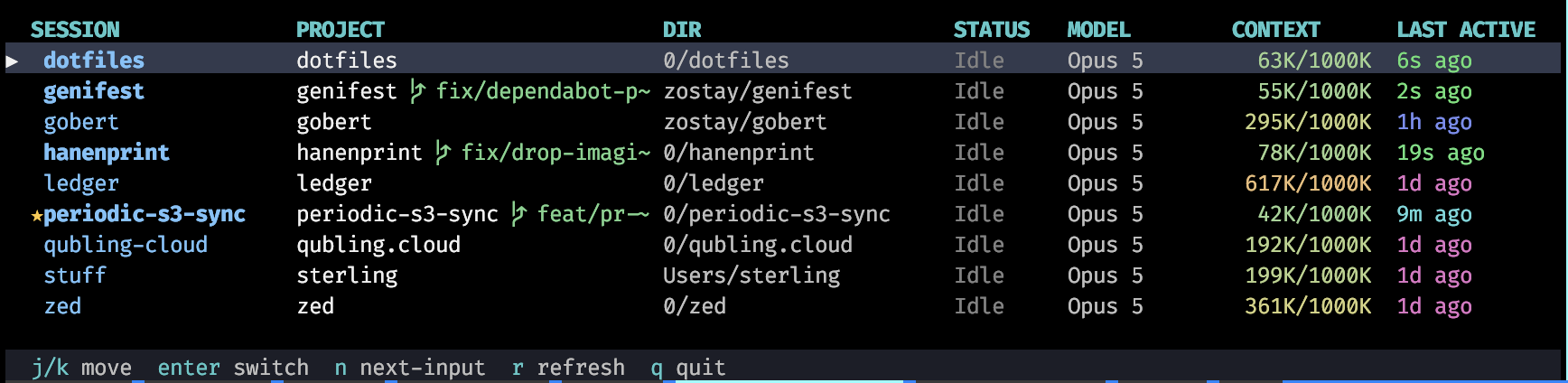
The sessions table.
The tool reads my session information for all my agents every 5 seconds or so. It responds to mouse clicks in the terminal and also has, as you can see from the status bar at the bottom, keyboard shortcuts.
The columns are as follows:
- SESSION. This lists the session name (using the
tmuxsession name) that the agent is running within. The session name is bold if I’ve done anything with it in the last hour, helping me keep the active sessions top of mind. And it automatically color-codes sessions based on the agent and config. On my other laptop, the sessions are blue for my main work Claude, purple for a client Claude, and aqua for Codex. - PROJECT. This lists the project directory and branch name that is currently open. I didn’t mention it with
workonabove, but I have my own support for git worktrees that allows the same project to be opened multiple times, so I can have the same project open multiple times in different working directories. - DIR. This shows my directory layout. The
stuffproject above is special and one I use to run general tasks on my laptop from my home directory. - STATUS. This usually shows Idle, but can show Running in green if the agent is currently doing work or Input in red if the agent is waiting for me to answer a question.
- MODEL. Lists the model the session is using. On my personal laptop, this is currently almost always Opus, but I use a greater variety of models on my work laptop based on project, client, and task.
- CONTEXT. It is often helpful to see how much context is in use and that number means more if you know how much context is possible for a given model. I keep a file caching how much context each model permits and then the color of the used/total display heats up if I’m using more context.
- LAST ACTIVE. This final column shows how long it has been since I used that session. If the session is more than a day old, I usually switch to it and close it since I’m not working on it. However, I mostly use it (with the bolding of the SESSION column) to track which tasks I recently asked for work on so I can go see what happened with a recent request. Recent work is in green which cools off to pink over time.
My workon script combined with sessions allows me to work on many things at once and context switch more easily. It makes it easy to keep track of what is going on and how.
Anyway, I am fantastically happy with how this tool helps me stay productive and engaged even though every agent presents a hurry-up-and-wait task. I type a prompt and then I can’t do much but watch it work for the next several minutes (or sometimes hours). That’s not a good use of my time. I don’t want to look away from the terminal and come back to find that last session got stuck waiting for input thirty minutes ago and has done nothing since. The sessions tool keeps that from happening, keeps me from wandering off to other things, and makes sure my agents stay productive too.
⭐️⭐️⭐️⭐️⭐️ Highly recommend.
These were small amounts of work to set up. The workon script has been in development for over a decade in one form or another, but heavily rewritten in recent months. The sessions script is brand new. These are each tuned to my work preferences and keep me productive. I’ve considered creating projects to share them, but I don’t really want to risk my convenient little tools through the process of generalization. If someone expresses interest, I might change my mind.
Cheers.